Advanced Tips
This guide will help you configure your Master and Slave Nodes for more advanced use cases.
.env File
The .env file in the tig-benchmarker directory contains environment variables for both Master and Slave nodes:
# Version of all benchmarker containers.
VERSION=0.0.1
# Set to 1 to enable verbose logging. Keep it empty for quieter logs.
VERBOSE=1

## Set the POSTGRES_USER, POSTGRES_PASSWORD, POSTGRES_DB, UI_PORT, DB_PORT, MASTER_PORT to your desired values.
POSTGRES_USER=postgres
POSTGRES_PASSWORD=mysecretpassword
POSTGRES_DB=postgres
UI_PORT=80
DB_PORT=5432

# Used by both Master and Slave.
MASTER_PORT=5115
# Used by Slave to connect to Master. Set it to 172.17.0.1 if the Master and Slave are running on same server.
MASTER_IP=172.17.0.1

# Directory for Slave to download algorithms. Mounts to /app/algorithms inside the Slave containers.
ALGORITHMS_DIR=./algorithms
# Directory for Slave to store results. Mounts to /app/results inside slave containers.
RESULTS_DIR=./results
# Seconds for results to live
TTL=300
# Name of the Slave. Defaults to randomly generated name.
SLAVE_NAME=
# Number of worker threads to spawn in the Slave container.
NUM_WORKERS=8
In particular, you will want to adjust the following ones:
POSTGRES_PASSWORD: the password used to connect to your Master node’s databaseMASTER_PORT: the port your Slave nodes uses for connecting with your Master nodeMASTER_IP: the ip of the server that your Master node is running onSLAVE_NAME: the name of your Slave node. You should name your Slave nodes to work with your Master’s config. See Routing BatchesNUM_WORKERS: the maximum number of benchmarks that your Slave node can run concurrently
Listing Algorithms
Adapt the following command to list all the available algorithms for a specific challenge:
export CHALLENGE=satisfiability
docker run ghcr.io/tig-foundation/tig-monorepo/$CHALLENGE/runtime:0.0.1 list_algorithms --testnetExample output:
docker exec satisfiability list_algorithms
...
id: c001_a056    name: sat_maximize_high    status: active with 0 merge points
id: c001_a057    name: sat_separate_vav     status: active with 0 merge points
id: c001_a058    name: sat_hybrid_vav       status: active with 0 merge points
id: c001_a059    name: sat_unified          status: merged @ round 62
id: c001_a060    name: sat_unified_opt      status: merged @ round 71
id: c001_a061    name: better_sat           status: merged @ round 65
id: c001_a062    name: even_better_sat      status: active with 0 merge points
Customising Nodes
If you edit the code for Master and/or Slave node, you will need to add --build to the docker-compose command:
docker-compose -f master.yml up --buildHard Resetting Nodes
Run the following command to hard reset the Master node and/or Slave nodes:
- Kill all running containers:
docker-compose -f master.yml down- Delete the Postgres database:
rm -rf db_data- Pull the latest image:
docker-compose -f master.yml pullOptimizing Master Config
Visit http://localhost:80/config to edit your Master node’s config
Routing Batches
The slaves field controls how benchmark batches are routed.
The example below routes CPU algorithms to Slaves with name starting with cpu-, and GPU challenges to Slaves with name starting with gpu-:
"slaves": [
  {
    "name_regex": "cpu-.*",
    "algorithm_id_regex": "c00[123].*",
    "max_concurrent_batches": 1
  },
  {
    "name_regex": "gpu-.*",
    "algorithm_id_regex": "c00[45].*",
    "max_concurrent_batches": 1
  }
]
Note that algorithm_id is prefixed with the <challenge_id>.
c001satisfiabilityc002vehicle_routingc003knapsack
Selecting an Algorithm for Benchmarking
The algo_selection field is a list of algorithms for which your Master will schedule benchmarks.
Example:
"algo_selection": [
  {
    "weight": 1,
    "batch_size": 8,
    "track_settings": {
    "<track_id>": {
    "num_bundles": 4,
    "hyperparameters": null,
    "fuel_budget": 123456
  },
  ...
  }
    "algorithm_id": "c001_a004"
  }
]
Notes:
algorithm_id: See listing algorithms.batch_size: A benchmark is split into batches with<batch_size>nonces each. Must be a power of 2.weight: An algorithm is chosen for benchmarking with probabilityweight / total_weight.track_settings: A dictionary where each key is atrack_id. Onetrack_idis selected randomly per benchmark from the available tracks for the given challenge. For eachtrack_id:num_bundles: Sets the total number of bundles in the benchmark. The minimum is 4. The number of nonces in the benchmark is calculated asnum_bundlesX bundle_size for thattrack_id. Recommend starting withbatch_sizeX number of slaves / bundle_size for that ‘track_id’.hyperparameters: Sets the hyperparameters for the given algorithm,algorithm_id. Null uses the default hyperparameters. Runhelp_algorithmfor more details on hyperparameters for your chosenalgorithm_id.fuel_budget: Sets the fuel budget for the benchmark when this track is selected.
Automating Config Updates
Your Master node exposes 3 useful endpoints:
/get-config(GET)/update-config(POST)/get-latest-data(GET)
This script is an example of using those endpoints to programmatically update the Master config
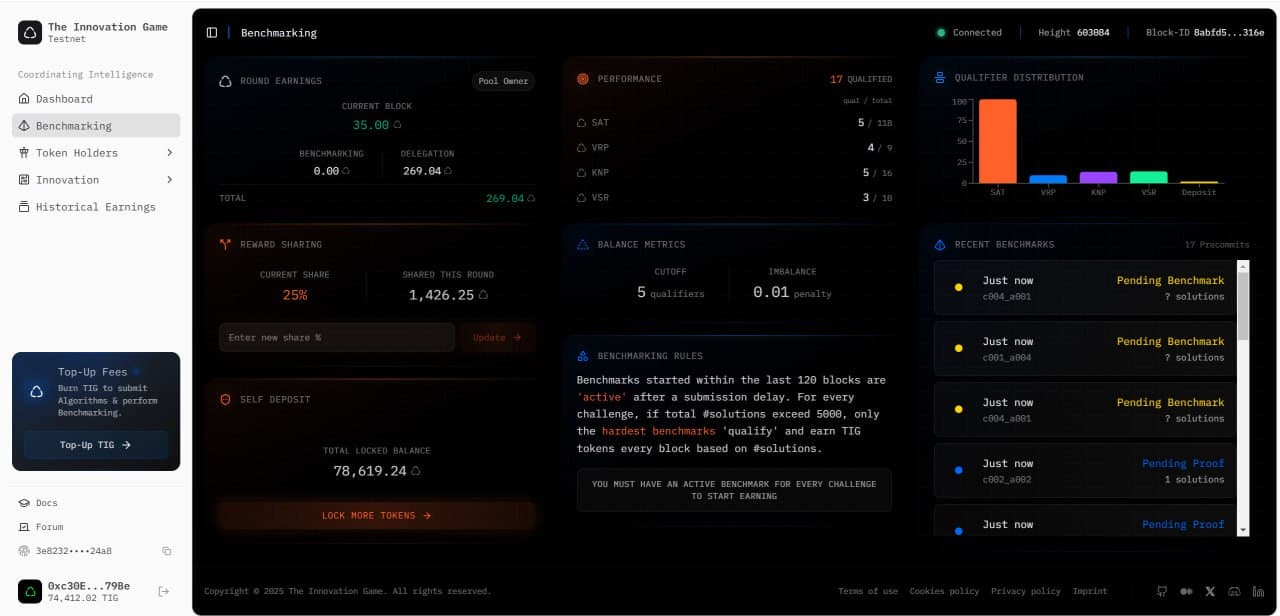
Reward Share
Benchmarkers can share a percentage of their rewards with their delegators. The reward share can range from 0% to 25% and can be updated once every 60 blocks. This is to attract delegators to delegate their deposits to your Benchmarker.
Visit the Benchmarking page on the dashboard to set your reward share percentage.